A QUIC introduction to modern network performance: Browser

Modern network components This post was inspired by Ilya Grigorik and his amazing efforts to promote performance knowledge in almost every computer level (application, network stack and etc.). But before we start to explore these topics, let’s review the “golden rules” of high performance web sites. (some of them will be better off with http2 🙂 )

  1. Make Fewer HTTP Requests
  2. Use a Content Delivery Network
  3. Add an Expires Header
  4. Gzip Components
  5. Put Stylesheets at the Top
  6. Put Scripts at the Bottom
  7. Avoid CSS Expressions
  8. Make JavaScript and CSS External
  9. Reduce DNS Lookups
  10. Minify JavaScript
  11. Avoid Redirects
  12. Remove Duplicate Scripts
  13. Configure ETags
  14. Make AJAX Cacheable

This is a series of articles about modern network performance:

  1. Browser
  2. HTTP 1.x / HTTP/2
  3. TCP / QUIC (UDP)
  4. IP / IPv6

Browser

If you’re lazy about reading, watch this short video how browsers work.

It’s crucial to understand how Browsers work so you can optimize your page to load fast, believe me speed is a feature. Let’s suppose your browser is getting a response from example.com. It’ll receive a stream of bytes then it will convert it to characters (following the adopted encoding) and parse the chars to tokens and finally build the nodes which constitute the DOM. A picture is worth a thousand words. A similar process will also happen to build the CSSOM. But we’re not done yet, usually a page requires dozens of external resources (mostly: images, js and css), some of these resources are block rendering. For example, a simple page has CSS and JS as external resources. The browser will first get HTML build the DOM then it’ll find that it needs to download the css and js, after these files are downloaded it needs to build CSSOM, run the JS and rebuild the DOM, only after all these steps the browser will render the page. But the same page using non blocking css (media type/query) and js (async attribute) will make it render quicker, the steps between the first download (html) to render are reduced. It’ll render the page after the first DOM building.

A video (from Umar Hansa) that summarizes this

Some considerations

  • All the great images above were stolen from Google’s web fundamentals.
  • HTML and CSS are render blocking.
  • For CSS you can specify media types and media queries to avoid render blocking.
  • Javascript can change DOM and CSSOM, therefore its execution will block in both.
  • Declare your Javascript as async when you can.
  • Avoid CSS import
  • Inline render-blocking css
  • That’s all folks
<!-- this will block (you still can inline it) -->
<link href="style.css" rel="stylesheet">

<!-- this will block -->
<script src="app.js"></script>

<!-- this won't block -->
<link href="style.css" rel="stylesheet" media="print">

<!-- these won't block -->
<script src="user.js" async></script>
<script src="vendor.js" async></script>

It’s also very important to understand how Javascript works.
FIFA 2014 World Cup live stream architecture

live_stream_nginx We were given the task to stream the FIFA 14 World Cup and I think this was an experience worth sharing. This is a quick overview about: the architecture, the components, the pain, the learning, the open source and etc.

The numbers

  • GER 7×1 BRA (yeah, we’re not proud of it)
  • 0.5M simultaneous users @ a single game – ARG x SUI
  • 580Gbps @ a single game – ARG x SUI
  • =~ 1600 watched years @ the whole event

The core overview

The project was to receive an input stream, generate HLS output stream for hundreds of thousands and to provide a great experience for final users:

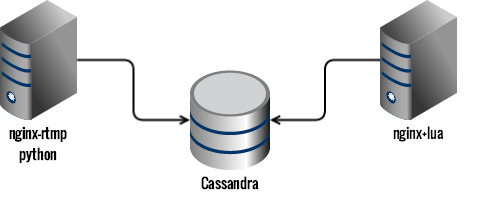
  1. Fetch the RTMP input stream
  2. Generate HLS and send it to Cassandra
  3. Fetch binary and meta data from Cassandra and rebuild the HLS playlists with Nginx+lua
  4. Serve and cache the live content in a scalable way
  5. Design and implement the player

If you want to understand why we chose HLS check this presentation only in pt-BR. tip: sometimes we need to rebuild some things from scratch.

The input

The live stream comes to our servers as RTMP and we were using EvoStream (now we’re moving to nginx-rtmp) to receive this input and to generate HLS output to a known folder. Then we have some python daemons, running at the same machine, watching this known folder and parsing the m3u8 and posting the data to Cassandra.

To watch files modification and to be notified by these events, we first tried watchdog but for some reason we weren’t able to make it work as fast as we expected and we changed to pyinotify.

Another challenge we had to overcome was to make the python program scale to x cpu cores, we ended up by creating multiple Python processes and using async execution.

tip: maybe the best language / tool is in another castle.

The storage

We previously were using Redis to store the live stream data but we thought Cassandra was needed to offer DVR functionality easily (although we still uses Redis a lot). Cassandra response time was increasing with load to a certain point where clients started to timeout and the video playback completely stopped.

We were using it as Queue-like which turns out to be a anti-pattern. We then denormalized our data and also changed to LeveledCompactionStrategy as well as we set durable_writes to false, since we could treat our live stream as ephemeral data.

Finally, but most importantly, since we knew the maximum size a playlist could have, we could specify the start column (filtering with id > minTimeuuid(now – playlist_duration)). This really mitigated the effect of tombstones for reads. After these changes, we were able to achieve a latency in the order of 10ms for our 99% percentile.

tip: limit your queries + denormalize your data + send instrumentation data to graphite + use SSD.

The output

With all the data and meta-data we could build the HLS manifest and serve the video chunks. The only thing we were struggling was that we didn’t want to add an extra server to fetch and build the manifests.

Since we already had invested a lot of effort into Nginx+Lua, we thought it could be possible to use lua to fetch and build the manifest. It was a matter of building a lua driver for Cassandra and use it. One good thing about this approach (rebuilding the manifest) was that in the end we realized that we were almost ready to serve DASH.

tip: test your lua scripts + check the lua global vars + double check your caching config

The player

In order to provide a better experience, we chose to build Clappr, an extensible open-source HTML5 video player. With Clappr – and a few custom extensions like PiP (Picture In Picture) and Multi-angle replays – we were able to deliver a great experience to our users.

tip: open source it from day 0 + follow to flow issue -> commit FIX#123

The sauron

To keep an eye over all these system, we built a monitoring dashboard using mostly open source projects like: logstash, elastic search, graphite, graphana, kibana, seyren, angular, mongo, redis, rails and many others.

tip: use SSD for graphite and elasticsearch

The bonus round

Although we didn’t open sourced the entire solution, you can check most of them:


Discussion / QA @ HN

How to start learning high scalability

distributed systems

When we usually are interested about scalability we look for links, explanations, books, and references. This mini article links to the references I think might help you in this journey.

DISCLAIMER:

You don’t need to have N machines to build/test a cluster/high scalable system, currently you can use Vagrant or docker and up N machines easily.

THE REFERENCES:

Now that you know you can empower yourself with virtual servers, I challenge you to not only read these links but put them into practice.

Good questions to test your knowledge:

  • Why to scale? how people do that usually?
  • How to deal with user session on memory RAM with N servers? how LB know which server is up? how LB knows which server to send the request?
  • Isn’t LB another SPOF? how can we provide a failover for LB?
  • Isn’t my OS limited by 64K ports? is linux capable of doing that out of the box?
  • How does mongo solves failover and high scalability? how about cassandra? how cassandra does sharding when a new node come to the cluster?
  • What is cache lock? What caching policies should I use?
  • How can a single domain have multiple IP addresses (ex: $ host www.google.com)? What is BGP? How can we use DNS or BGP to serve geographically users?

Bonus round: sometimes simple things can achieve your goals of making even an AB test.

Please let me know any mistake, I’ll be happy to fix it.

Redundancy and failover on your life

Very simplified introduction: failover is the ability to keep using a service or device in case it fails, and you usually achieve that by having redundancy, having more than one service or device at time. A silly example could be when the power goes off in your house, you can handle that (failover) by having and using a flashlight (redundancy) as backup light system.

In my life I faced similar problems all the time and I think it is valid to share that. I’ll start with the very basic service (but currently very necessary) Internet, suppose we’re not at home or we’re travelling or our beloved ISP is off, I deal with that by having an extra 3G modem and Kindle with 3G free-worldwide.

travel quite often and everytime sometimes I face issues with outlets.  My notebook is meant to be used on Brazil outlet pattern but when I go to US I need to use an outlet adapter. It is not a very accurate failover mechanism however travelling with one world outlet adapter can save you from some pain.

The main way I have fun is by playing games; then in case of my console broke or the power went out I have the portable, again it’s not quite accurate a failover mechanism but for my purpose it is.

Another area is TV, suppose my TV was stealed I can keep watching it by using my usb tv or even my gps tv.

Going to digital world I can tell you endless stories and ways to have failover. The most obvious could be have your files in your computer but keep it also in a cloud storage. I love this thing about digital buying, I used to buy games digitally (Steam, eShop, PSN) and even though I change computer I don’t need dirty old DVD’S to recovery my games, they are all associated with my account.

These last two are the best IMHO: make all the documents you have digital copy (this is easy today since any smartphone can take pictures), try to attached them to cloud (email, storage…), it saved me a lot of time. You should have at least two phone numbers of a service (food delivery, cab, hospital and etc.) because sometimes you don’t have easy access to get this info.

And you, what do you do to have failover in your life?

Clojure resources

Always that I start to learn a new language, I promise to keep the best resources links I found, but it never works. This post suppose to be updated often. Any broken link or suggestion, just comment and I’ll try to fix, add or remove it.

Links, tutorials, guides, documentations, screencasts and etc.

  1. Clojure official site
  2. Installing Clojure, clojure-contrib and setup EMACS.
  3. Vim and “Slime”
  4. VIM for Clojure
  5. Quick-start with examples
  6. VIDEO – Great short introduction videos for Clojure!
  7. VIDEO – Introduction to logic programming with Clojure
  8. VIDEO – Clojure for Java Programmers 1 of 2
  9. VIDEO – Functional programming by UCBerkeley 
  10. VIDEO – Great tutorial for Clojure focused on concurrency
  11. Try code clojure online
  12. Leiningen tutorial for beginners
  13. Midje – A test framework for Clojure
  14. Clojars – Community repository for open source clojure libraries

Books