This is the second post in the series where we develop an edge computing platform. In this post, we’ll add some code/behavior to the front end servers. Here’s a link to the previous entry.
Add code inside the front end
The OTT service we did before don’t employ any kind of authentication thus the users can watch the streams for free. To solve this authentication issue we can add Lua code embed into nginx.
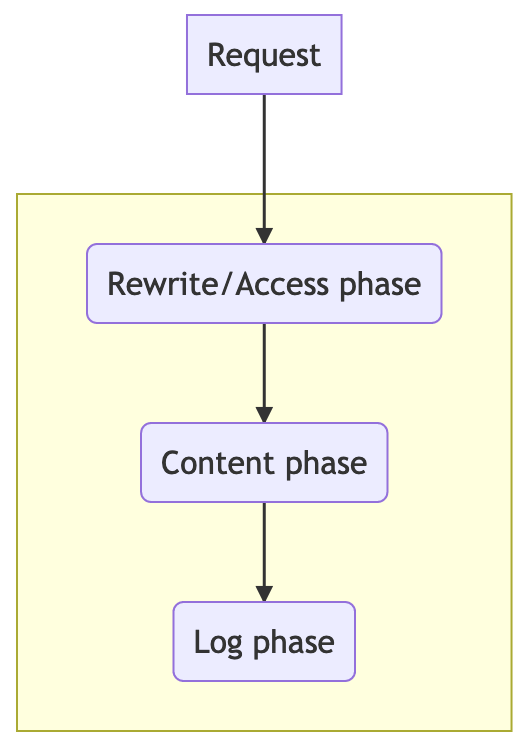
To run Lua code inside nginx you need to understand a little bit of the request phases within the server. The request will travel across different stages where you can intercept it using Nginx directives and add the code.
Just for the sake of learning, the authentication logic will be a straightforward token system. During the access phase, we’ll deny access for those with no proper authentication. Once a user has the required token it’s going to be persisted in form of a cookie.
Fixed token with no expiration is unsafe for production usage, you should look for something like JWT.
This file contains hidden or bidirectional Unicode text that may be interpreted or compiled differently than what appears below. To review, open the file in an editor that reveals hidden Unicode characters.
Learn more about bidirectional Unicode characters
The edge server can run useful behavior/code, now let’s laid out some examples that demonstrate the power we can have while executing functions at the front end.
Suppose a hacker, behing the IP 192.168.0.253, is exploting a known issue, that is going to be fixed soon. We can solve that by forbiddening his/her IP. Adding lua code, to the same phase, can fix this problem.
This file contains hidden or bidirectional Unicode text that may be interpreted or compiled differently than what appears below. To review, open the file in an editor that reveals hidden Unicode characters.
Learn more about bidirectional Unicode characters
Nginx has the deny directive to solve this problem although it doesn’t allow a dynamic way to update the IP list. We would need to reload the server every time we want to update the IPs.
It’s wanted to avoid different domains to consume our streams, to prevent that, we’re going to examine the referer header and reject all the requests not originated from our domain.
This file contains hidden or bidirectional Unicode text that may be interpreted or compiled differently than what appears below. To review, open the file in an editor that reveals hidden Unicode characters.
Learn more about bidirectional Unicode characters
To on-the-fly change the response from the backend, we’ll add a custom HLS tag in the playlist.
This file contains hidden or bidirectional Unicode text that may be interpreted or compiled differently than what appears below. To review, open the file in an editor that reveals hidden Unicode characters.
Learn more about bidirectional Unicode characters
To decorate the HTTP headers, we’ll attach new ones exposing some metrics from the server and for that matter, it can rely on the ngx.header[‘name’] API.
This file contains hidden or bidirectional Unicode text that may be interpreted or compiled differently than what appears below. To review, open the file in an editor that reveals hidden Unicode characters.
Learn more about bidirectional Unicode characters
Finally, we’ll count how many requests a given user (based on her/his IP) does and expose it through a custom HTTP header. The counter was stored in Redis.
This file contains hidden or bidirectional Unicode text that may be interpreted or compiled differently than what appears below. To review, open the file in an editor that reveals hidden Unicode characters.
Learn more about bidirectional Unicode characters
All this is working, if you want, you can test it by yourself.
This file contains hidden or bidirectional Unicode text that may be interpreted or compiled differently than what appears below. To review, open the file in an editor that reveals hidden Unicode characters.
Learn more about bidirectional Unicode characters
[…] This is the second post in the series where we develop an edge computing platform, in this post, we’ll finally build the edge computing platform. Here’s a link to the previous entry. […]
[…] is to have a software where we can explore the computation at the edge. The next post will be empowering the Nginx front end with Lua code to add features to NOTT, things like authentication and IP […]
[…] This is the last post in the series, now we’re going to design an edge computing platform using Lua, Nginx, and Redis cluster. Previously, we explained how to add code, not dynamically, in nginx. […]
[…] That’s the closing publish inside the sequence, now we’re going to love an edge computing platform the command of Lua, Nginx, and Redis cluster. Beforehand, we outlined systems to add code, no longer dynamically, in nginx. […]
 Leandro Moreira
[…] Add edge computation to NOTT – empower nginx with lua code […]
[…] This is the second post in the series where we develop an edge computing platform, in this post, we’ll finally build the edge computing platform. Here’s a link to the previous entry. […]
[…] is to have a software where we can explore the computation at the edge. The next post will be empowering the Nginx front end with Lua code to add features to NOTT, things like authentication and IP […]
[…] This is the last post in the series, now we’re going to design an edge computing platform using Lua, Nginx, and Redis cluster. Previously, we explained how to add code, not dynamically, in nginx. […]
[…] That’s the closing publish inside the sequence, now we’re going to love an edge computing platform the command of Lua, Nginx, and Redis cluster. Beforehand, we outlined systems to add code, no longer dynamically, in nginx. […]